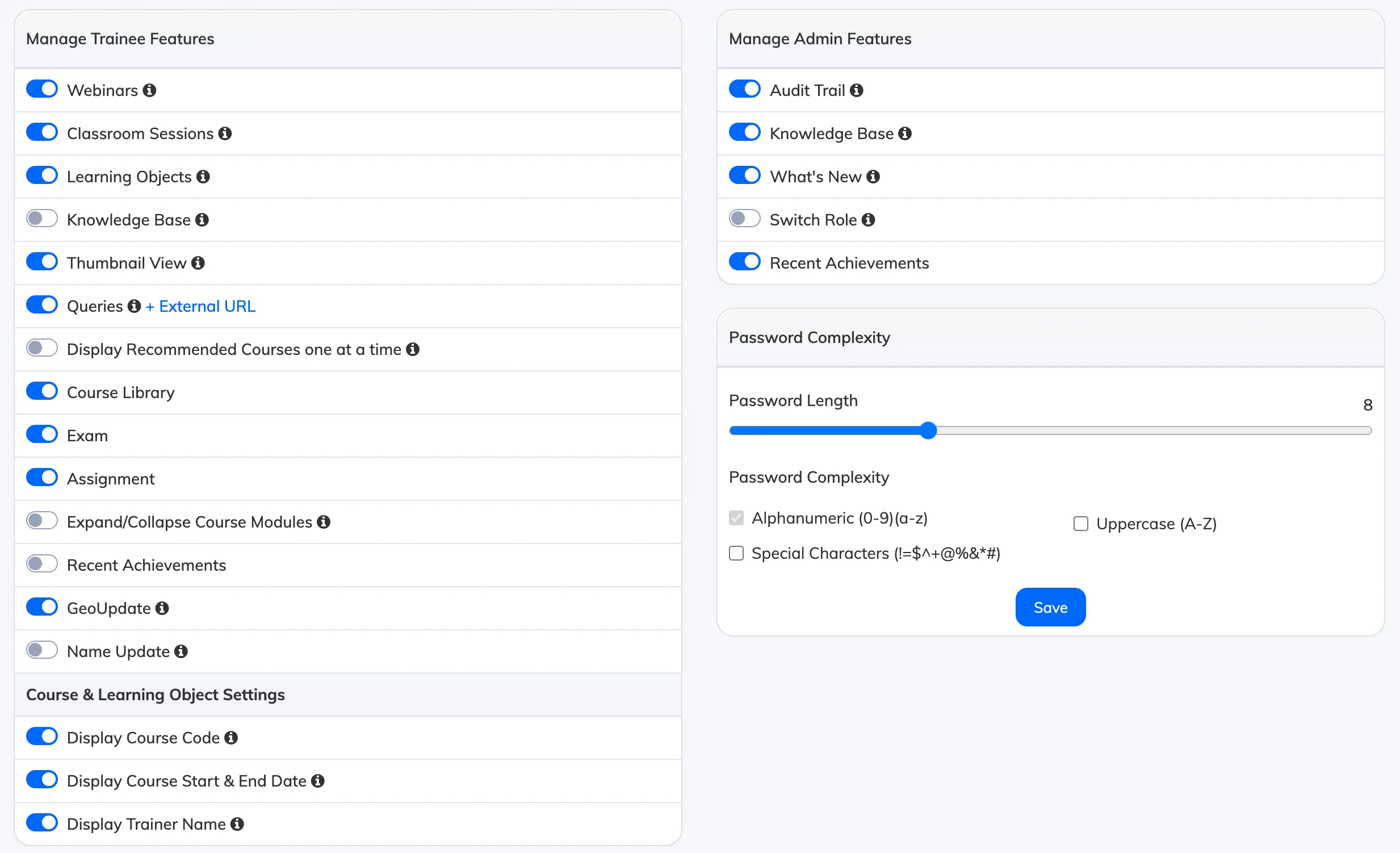
The Manage Features section lets you enable or disable LMS features for Admins, Managers, Trainers, and Trainees – tailoring the platform to your organisation’s needs.
Access
Go to Settings → Manage Features and toggle features on or off in each section.
Admin Features
- Audit Trail – Enables the Audit Trail report under Reports.
- Knowledge Base – Allows admins and managers to view Knowledge Base articles within the LMS.
- What’s New – Shows a section where admins and managers can read about new LMS features.
- Switch Role – Allows Admins, Managers and Trainers to access a subordinate’s account for troubleshooting.
- Recent Achievements – Displays a tile showing the 10 latest completed activities. Click the tile to view the full Recent Achievements Report.
Learner Features
- Webinars – Learners can view upcoming and concluded webinars and meetings.
- Classroom Sessions – Learners can view upcoming and concluded classroom sessions.
- Learning Objects – Learners can access their assigned Learning Objects.
- Knowledge Base – Learners can view Knowledge Base articles within the LMS.
- Thumbnail View – When enabled, courses are shown in thumbnail view. When disabled, courses appear in list view.
- Queries – Learners can submit queries. To use an external helpdesk, enable this feature and enter your external URL – learners will be redirected to it when they click the Queries tile or link.
- Display Recommended Courses One at a Time – Learners see one recommended course at a time per recommendation, rather than all at once.
- Course Library – Learners can browse and self-enroll in courses from the library.
- Exam – Learners can view and attempt exams linked to their enrolled courses.
- Assignment – Learners can view and submit assignments linked to their enrolled courses.
- Expand / Collapse Course Modules – When enabled, learners view one module at a time. When disabled, all modules are expanded by default.
- Recent Achievements – Displays a tile showing the 10 latest completed activities.
Common Features
- Session Timeout – Time of inactivity after which users are logged out. Does not apply to mobile apps.
- Timezone, Language, Country & Country Code – Sets the default values for all new users. Changes apply to new users only, not existing ones.
- Password Expiry – Sets how long before users are required to change their password.
Password Complexity
- Password Length – Minimum number of characters required.
- Password Complexity – Enforce uppercase letters and special characters for stronger passwords.
Website Settings
- Homepage & Logout URL – Set these if your website is built using the AlphaLearn API or WordPress plugin.