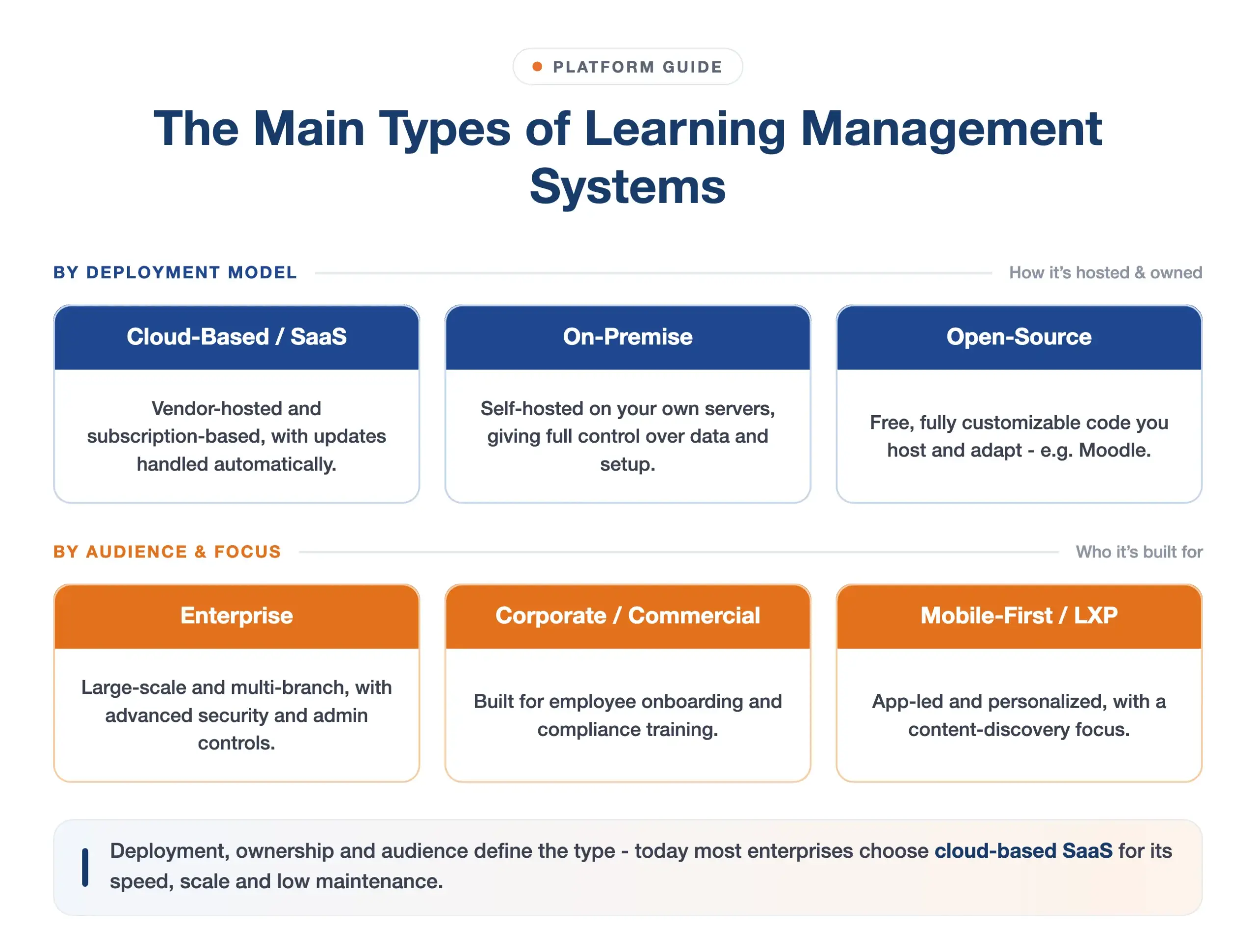
Learning management systems are classified by how they are deployed, who owns the infrastructure, and who they are built for. The six main types are cloud-based (SaaS) LMS, on-premise LMS, open-source LMS, enterprise LMS, corporate or commercial LMS, and mobile-first LMS or learning experience platforms (LXP). Most modern organisations now choose a cloud-based SaaS LMS – the cloud segment is expected to make up around 77% of the global LMS market in 2026 (Coherent Market Insights), and the overall market is projected to grow from USD 28.58 billion in 2025 to USD 123.78 billion by 2033 (Grand View Research).
For Indian enterprises, the choice of LMS type carries additional weight. Data residency requirements under the Digital Personal Data Protection (DPDP) Act 2023, multilingual workforce needs across 12 or more regional languages, and the scale of regulated industries such as BFSI, pharma and manufacturing all influence which deployment model makes the most sense. This guide defines each type, explains the trade-offs, and gives a practical framework for choosing.
How learning management systems are classified
LMS types are defined along four axes:
- Deployment: cloud (vendor-hosted) vs on-premise (self-hosted on your own servers)
- Source model: proprietary (commercial licence) vs open-source (freely available code)
- Audience: corporate or enterprise (employee training) vs academic (students and institutions)
- Experience model: traditional LMS (structured courses and tracking) vs LXP (personalised, discovery-led learning)
A single product can sit in more than one category. An enterprise LMS is typically also cloud-based and corporate. A white-label LMS is usually a SaaS LMS with custom branding. Understanding the axes helps you filter options quickly.
The six main types of LMS
1. Cloud-based (SaaS) LMS
A cloud-based or SaaS LMS is hosted and maintained by the vendor on shared infrastructure and accessed over the internet on a subscription. There is nothing to install or upgrade – the vendor handles security patches, new features and scaling automatically. This is the default choice for the majority of organisations today.
- Pros: fast to deploy (often live within days), low IT overhead, automatic updates, scales with headcount, accessible from any device or location, lower upfront cost.
- Cons: ongoing subscription cost; data is hosted by the vendor rather than on your own servers (choose a provider with in-country data residency – for India, look for AWS Mumbai or equivalent).
- Best for: most enterprises, especially distributed teams, organisations without large IT departments, and businesses that need to be live quickly.
For a detailed evaluation framework, read the cloud LMS buyer’s guide. To compare cloud and self-hosted options, see the cloud-based LMS page.
2. On-premise LMS
An on-premise LMS is installed and run on your own servers and network infrastructure, giving your organisation direct control of the software environment and all data. Your IT team manages hosting, maintenance, upgrades and disaster recovery.
- Pros: maximum control over data storage and security configuration; can satisfy strict internal policies that prohibit cloud hosting; no recurring subscription.
- Cons: high upfront licence and infrastructure cost; slower to scale; upgrade cycles require IT effort; your team absorbs the operational burden entirely.
- Best for: large organisations with an explicit on-premise data mandate, strong in-house IT capacity, and where budget for capital expenditure is available.
Note: for Indian enterprises with data sovereignty concerns but no hard on-premise mandate, a cloud LMS hosted on AWS Mumbai under a DPDP-compliant data processing agreement is often a better balance of control and cost than self-hosted.
3. Open-source LMS
An open-source LMS makes its source code freely available under an open licence, so you can host and customise it yourself. Moodle is the most widely deployed example, with over 300 million users globally. The software itself carries no licence fee, but hosting, customisation, and ongoing support all have a cost.
- Pros: no licence fee; fully customisable at the code level; large global community; supports SCORM, xAPI and LTI standards.
- Cons: requires developer or technical expertise to deploy and maintain; total cost of ownership (hosting, development, support, upgrades) can exceed that of a SaaS LMS once all costs are counted; slower to implement than a ready-made platform.
- Best for: universities, training providers, and technical teams that need deep customisation and have internal developer capacity to manage the platform long-term.
4. Enterprise LMS
An enterprise LMS is built for large organisations with thousands or tens of thousands of learners across multiple branches, departments or geographies. It emphasises scalability, advanced security, granular role-based access control, deep analytics and integrations with HR and ERP systems.
- Pros: scales to very large headcounts without performance degradation; strong security and compliance controls (SOC 2, ISO 27001); multi-branch and multi-language administration; audit-ready reporting.
- Cons: requires more configuration at the outset; pricing is typically per-user-per-year at enterprise tiers.
- Best for: large Indian conglomerates and regulated enterprises in BFSI, pharma, healthcare and manufacturing where compliance audit trails, multi-location administration and DPDP-aligned data handling are non-negotiable.
5. Corporate / commercial LMS
A corporate or commercial LMS is a proprietary platform built specifically for employee training, onboarding, compliance, sales enablement and upskilling – rather than academic teaching. Most corporate LMS products are cloud-based and overlap with the enterprise and SaaS categories. The term “corporate LMS” signals the use case (business training) rather than a technical deployment distinction.
- Pros: purpose-built workflows for compliance reporting, certification management and business training; vendor support and onboarding included; faster time-to-value than building on open-source.
- Cons: subscription cost; vendor dependency for roadmap and integrations; less suited to academic or degree-granting use cases.
- Best for: companies training employees, partners or customers – from 50-person startups to 50,000-person enterprises. See how a TMS compares to a corporate LMS if you are also managing instructor-led training logistics.
6. Mobile-first LMS and LXP
A mobile-first LMS is designed with phone and tablet delivery as the primary interface rather than an afterthought. A learning experience platform (LXP) adds personalised, AI-driven content discovery and social learning on top of standard LMS functionality – closer to Netflix for learning than a traditional course catalogue. Read a detailed comparison in LXP vs LMS. AlphaLearn’s mobile app supports offline access, push notifications, and 12 Indian languages on iOS and Android.
- Pros: high learner engagement; ideal for deskless, frontline and field workforces; personalised learning paths; works on low-bandwidth connections.
- Cons: a full LXP can be more capability than smaller teams need; sometimes layered on top of an existing LMS, adding cost and complexity.
- Best for: organisations with large frontline or deskless workforces (retail, manufacturing, logistics, field sales) or companies with a strong focus on self-driven upskilling and continuous learning.
Other variants: free, white-label and HR LMS
Beyond the six main types, three variants come up frequently in buyer research:
- Free LMS: limited-feature or freemium tiers offered by commercial vendors. Suitable for very small teams or pilots, but typically restricted in users, storage or reporting. Most organisations outgrow them quickly.
- White-label LMS: a SaaS LMS that you can fully rebrand with your own logo, colours and domain so it appears to end users as your own product. Used by training providers, franchisors and companies that want a branded learner experience without building from scratch.
- HR LMS: a learning platform positioned specifically for HR and people teams, often bundled with or tightly integrated into an HRMS or HCM suite such as SAP SuccessFactors or Darwinbox. Convenient if learning is already inside your HR platform, but often shallower in LMS-specific features than a dedicated platform.
Comparison of LMS types at a glance
| LMS type | Deployment | Cost model | IT burden | Best for |
|---|---|---|---|---|
| Cloud / SaaS | Vendor-hosted | Subscription | Low | Most enterprises |
| On-premise | Self-hosted | Licence + infrastructure | High | Strict on-prem data mandates |
| Open-source | Self-hosted | Free code + hosting/support | Very high | Technical teams, deep customisation |
| Enterprise | Usually cloud | Enterprise plan | Low – medium | Large, multi-branch organisations |
| Corporate / commercial | Usually cloud | Subscription | Low | Employee and compliance training |
| Mobile-first / LXP | Cloud | Subscription | Low | Deskless and self-driven learners |
Which type of LMS is right for your organisation?
For most Indian enterprises the answer is a cloud-based, corporate-grade LMS – it combines fast deployment, compliance-ready reporting, multilingual delivery and low IT overhead. Match the type to your situation:
- Large BFSI, pharma or manufacturing enterprise: a cloud-based enterprise LMS with ISO 27001 certification, AWS Mumbai hosting, audit trails, multi-branch admin and support for regulations such as the DPDP Act 2023, RBI training mandates and GMP compliance. See the LMS for BFSI, LMS for pharma and LMS for manufacturing pages.
- Mid-size company training employees: a corporate SaaS LMS that is quick to roll out, priced per user and includes onboarding support. Target: live within 1-2 business days.
- Education institution or training provider: consider a solution built for education or, if you have developers and need deep customisation, an open-source platform such as Moodle.
- Large deskless or field workforce: a mobile-first LMS with offline access, SMS OTP login and regional language support – particularly relevant for retail, logistics and manufacturing shop-floor teams.
For a deeper platform comparison, read online learning platforms for corporate training and training management system vs LMS. For pricing, see AlphaLearn pricing.
Three questions to ask any LMS vendor before shortlisting:
- Where is data hosted, and is it within India? (Relevant for DPDP Act compliance.)
- What compliance certifications does the platform hold? (ISO 27001:2022, SOC 2 Type II.)
- What is the average time to go live, and what does onboarding include?
How AlphaLearn fits
AlphaLearn is a cloud-based, enterprise-grade corporate LMS built in India and used by 500,000+ learners across regulated industries including BFSI, pharma, healthcare and manufacturing. It brings together the SaaS, enterprise and corporate types in one platform: scalable to multi-branch enterprises, compliance-ready (ISO 27001:2022 certified, DPDP Act 2023 compliant, hosted on AWS Mumbai), mobile-first with offline support, and available in 12 Indian languages. Explore the full feature set to see how it maps to your training requirements.
Next step: Request a personalised demo or start a 10-day free trial.
Frequently asked questions
What are the main types of LMS?
The main types of learning management system are cloud-based (SaaS), on-premise, open-source, enterprise, corporate/commercial, and mobile-first LMS or learning experience platforms (LXP). They are classified by how they are deployed, who owns the infrastructure, and who they are built for. Most modern organisations choose a cloud-based SaaS LMS.
What is the difference between cloud-based and on-premise LMS?
A cloud-based LMS is hosted and maintained by the vendor and accessed over the internet on a subscription – there is nothing to install and the vendor handles upgrades, security and scaling. An on-premise LMS is installed on your own servers and managed by your IT team. Cloud is faster to deploy, lower in IT overhead and easier to scale; on-premise gives more direct control of data storage and infrastructure but requires significant IT investment.
What is a SaaS LMS?
A SaaS (software-as-a-service) LMS is a learning management system that the vendor hosts in the cloud and you access on a subscription. There is nothing to install, and the vendor handles updates, security and infrastructure scaling. It is the most common LMS deployment model for businesses because of the low setup cost and fast time-to-live.
What is an enterprise LMS?
An enterprise LMS is a learning management system built for large organisations with thousands of learners across multiple branches, departments or countries. It focuses on scalability, advanced security, role-based access control, deep reporting and integrations with HR and ERP systems. Enterprise LMS platforms are common in regulated industries such as BFSI, pharma and manufacturing, where audit-ready compliance records are required.
What is a white-label LMS?
A white-label LMS is a learning management system that you can fully rebrand with your own logo, colours and custom domain so it appears to learners as your own product. It is typically a cloud/SaaS LMS with custom branding enabled, and is used by training providers, franchisors and companies that want a branded learner portal without building a platform from scratch.
Which type of LMS is best for corporate training?
A cloud-based, corporate-grade LMS is generally the best choice for corporate training because it combines fast deployment, compliance tracking, certification management and low IT overhead. For large or regulated Indian enterprises, a cloud-based enterprise LMS with ISO 27001 certification, in-country data hosting and multilingual support is the typical choice.
What is the best LMS for Indian enterprises?
For Indian enterprises, the best LMS is one that combines cloud deployment with data hosted within India for DPDP Act 2023 compliance, support for Indian regional languages, audit-ready compliance reporting, and integration with tools such as Zoom, MS Teams and SAP. Key certifications to look for are ISO 27001:2022 and AWS Mumbai hosting.
What is the difference between an LMS and an LXP?
An LMS (learning management system) is primarily an administrative and delivery platform – it manages course catalogues, tracks completions and generates compliance reports. An LXP (learning experience platform) adds personalised, AI-driven content discovery and social learning on top, shifting control towards the learner. Most organisations need LMS capabilities first; LXP features are most valuable once there is already a strong content library and a culture of self-directed learning. Read the full comparison: LXP vs LMS.
Priya Sharma
L&D Specialist
Priya has 9 years of experience designing corporate training programmes for BFSI and retail organisations across India. She specialises in onboarding, soft skills, and building learning cultures that actually stick.
Get Started
See AlphaLearn in action
500,000+ employees trained. ISO 27001:2022 certified.